If you’d like to delegate the billing portion of your Hutte plan to a different user, you can easily do so at no extra cost.
Adding a member in the billing user role will allow that member to view and manage your Hutte organization’s billing information without accessing the other functionalities of Hutte.
To invite a billing user to your Hutte organization, you must have Admin permissions.
- To get started, click on the “Members” tab in the top navigation bar.
- There, you’ll see a list of all the members currently in your organization, including member invitations that haven’t been accepted yet.
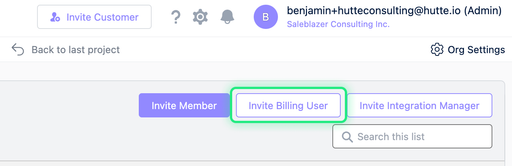
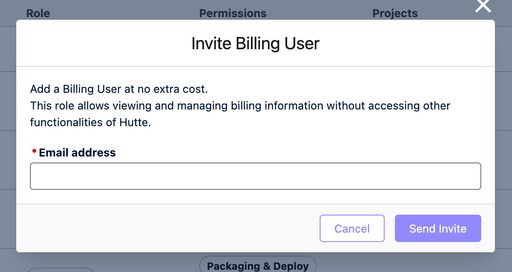
- In the top right corner, you’ll see the “Invite Billing User” button. Click on it to open a dialogue box.
- Here, enter the email address of the billing user you’d like to invite. Then, click “Send Invite.”
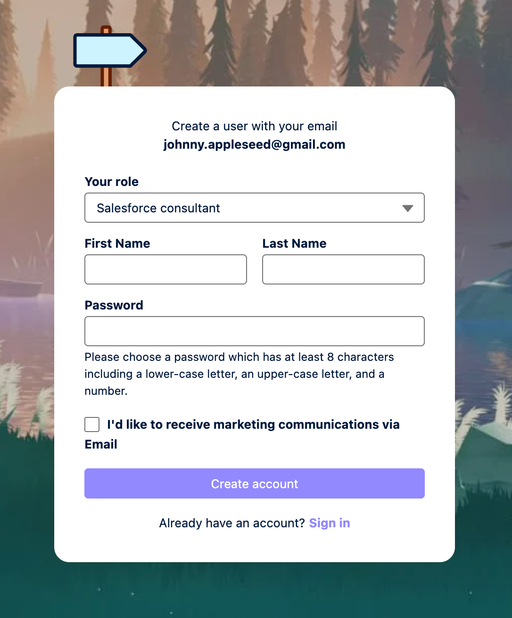
- The billing user will receive an email within a few minutes with an account activation link. Clicking on that link will take them to the account setup screen.
- Here, they can create their Hutte account and join your project. If the member already has a Hutte account, clicking the activation link will automatically log them in and add them to the Hutte Organization.
- The new member will be added with the “billing user” role. You can easily change a member’s role using the commands in the drop down menu next to their name.
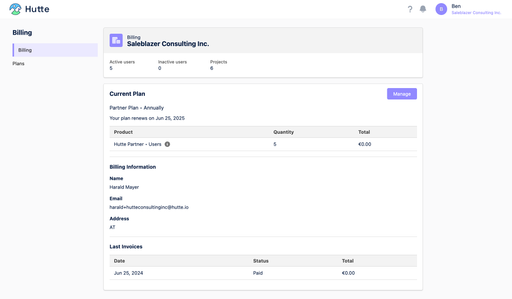
- A billing user will see only the “Billing” and “Plans” tabs in your organizations. They will be able to update the billing information, see invoices, and change your organization’s Hutte plan.